
In this article a formalized framework to analyze hidden costs of actions. Shadow costs potentially outweigh the benefits of AI development, thus making it a net negative. Governance on a nationwide level is insufficient and can be modeled by the tragedy of the commons. Hence to reduce the negative effects some AI developments should be slowed down and increasing effect-limiting work accelerated.
There is an ongoing discussion on the regulation of AI and new weapon systems worldwide. In 2021, Russia, India, and the USA blocked talks for an international treaty outlawing lethal autonomous weapon systems (LAWS), as reported by Reuters. Given that these countries are already producers of those weapon systems it is not that surprising. [1] The EU also plans an exception for military uses in the new AIA regulation that regulates the use of AI.[2] China, however, calls for prudent development and policy dialogue on military applications of AI (2021). Within the US some are pushing against regulation, like the US Security Commission on AI in fear of loosing a military-technical advantage.

Where is this advantage coming from? To increase accuracy and response time, and reduce the number of casualties, more and more weapon systems are being remotely controlled, and the operation is extended by cybernetic control algorithms. Advanced cybernetic control enables the new weapon category called "loitering munition" that could be placed between unmanned aerial vehicles (UAVs) and cruise missiles.
Fully automated weapon systems enable the systematic destruction of human lives on an unprecedented scale. It allows the industrialization of obliteration in form of products coming out of a factory. Hence, some NGOs[3] are pushing for an international treaty to draw a red line that is not to be crossed: the automatic decision to pull the trigger. The idea for an international treaty is to add a protocol to the United Nations Convention on Certain Conventional Weapons.
Would the regulation eliminate the danger of this new technology?
Does it make a big difference when the decision support system presents all information, target-locked, and the operator only needs to confirm the kill with a press of a button manually? The human in the loop forms an additional requirement not desired by the military. This single interaction makes drones require a constant radio connection. This makes stealth systems more vulnerable to detection and makes them a target for anti-radiation missiles. For guided missiles, the additional radio equipment means also additional costs during production and operation. Evaluating the signal by a human takes time, which can be used by the opponent’s system to evade. In the arms race of attack and defense, this potentially legal induced requirement draws a line.
One example where more autonomy is helping in war is "fire-and-forget" missiles that have been target-locked minutes ago using an infrared signal. This is currently a successful and common tactic in war, as seen again in the Russian-Ukrainian war. To avoid detection by Radar, the missiles use sea-skimming, a technique where the missile flies just above the water. Being undetectable is key to making the attack successful. Hence, having autonomous missiles can enable this attack, while a missile depending on line-of-sight must get too close and is in danger of being intercepted, or the launcher is shot before the missile is launched.
Even with regulation, finding ways around the laws is too easy to have a real effect, and technological systems will push hard against that legal line. Violations are far easier to cover because it is difficult to prove in the hardware that a missile or turret was using computer vision and other algorithms and not remotely controlled. Therefore, the final effect of a treaty is questionable in this case.
The Difference in Growth Rates: an Argument for Differential Technological Development
The growth in humanity’s wisdom is outperformed by the growth in power. Humanity’s wisdom is contained by the institutions and the knowledge passed along generations. In particular, I argue that each generation can only develop a limited amount of new views, hence the rate of progress in civilisation development has an upper bound. Older humans stick to the views they developed in their younger years[4] when their neural pathways were forming at a higher rate. Furthermore, all new information we obtain is set in relation to our knowledge base. Certain impactful experiences like leaving the place of your uprising for the first time are made only once in younger years and the experience itself is influenced by the conditions at that time.

In 1945, after the experiences the world made in both world wars, the United Nations Organisation (UNO) was founded which should reduce the risks of wars. It is a place to foster coordination but it has no power to control all nations as each nation has autonomy. We still have not found a way to deal with problems like self-inflicted existential risks e.g. a global thermonuclear war or climate change. This means that humanity currently wields more power than our maturity. Toby Ord compares humanity with the education of a child.[5] A child is bound by rules to ensure a safe uprising. We must lay down rules to govern ourselves as laid out before in the example of LAWS. As we have seen, the self-governance imposed by nations quickly ends up again in the tragedy of the commons. Everyone else has a nice, wealthy life, while your altruistic country who needs to cut short on wealth by introducing a Pigouvian tax to compensate others from the negative externalities your country caused. International constructs help overcome the limitations of the national idea but have not fully overcome it. The alternative to improving self-governance is reducing the risks we self-impose.
From side effects to net benefit calculation
Once, I had the opportunity to converse with someone pursuing a PhD in the fascinating field of computer vision. Their primary objective was to distinguish and isolate individuals within a video stream. Intrigued by the potential implications of this technology, I couldn't help but inquire about their thoughts on the possible misuse of their work in surveillance. To my unease, the person admitted they had never really considered it. Unfortunately, this kind of indifference is far too prevalent among students and engineers alike. The most notorious example lies in the development of nuclear technology, which inadvertently gave birth to a perilous nuclear arms race. Oftentimes, technology is devised to address a specific problem; however, its applications are seldom limited to that sole purpose. As a result, the unintended consequences and side effects are frequently overlooked.
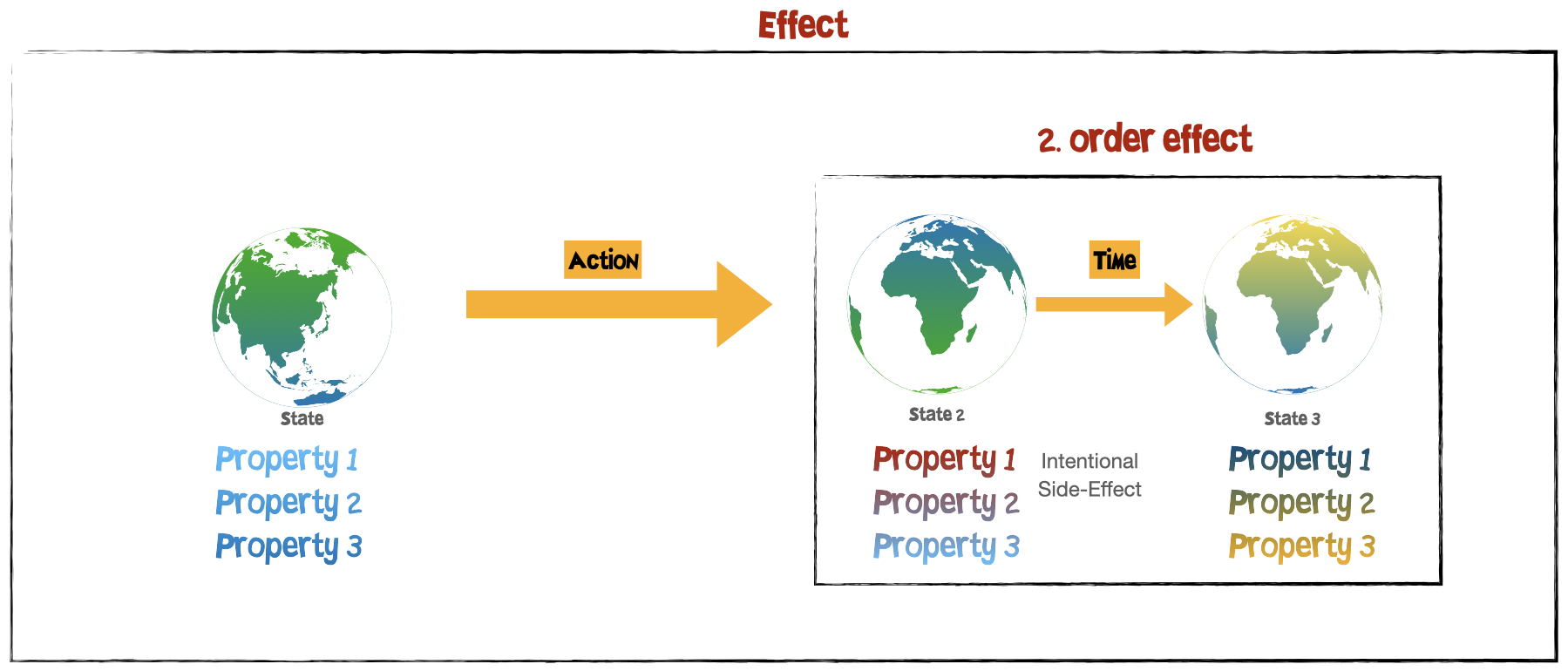
Let’t take a moment to explore an ontology of effects. What is an effect? An effect is the ontological category that describes the relationship between two phenomena: It describes the significance of a transformation of some phenomenon from one state to another. An effect thus consists of joined set of the three objects initial state, significance and resulting state. A state change induced by an action can become the significance of another effect, which show over time. The intentionally or primary point of interest leads to a possible distinction of a side-effect. All effects can be connected in a causal chain. By categorizing them into distinct objects we can label them as first-order, second-order effects, and so on. These nodes then form a Bayesian network, making it easier to understand their relationships and dependencies.

The goal is to obtain some ethics so our first-order effect is an action we want to pick.
In economic terms, the calculation of the net benefit or expected utility must also include the shadow costs. The shadow costs are the non-obvious or non-intentional costs associated with the action. The costs are the value we assign to each effect. In our model, there are many connections between each node. Since we do not have total information we can do a reasonable simplification.[6] The net benefit of advancing technology x can be written as the sum of the product of the probability that a problem b is solved by the technology and the utility of the solved problem plus the respective sum of the weighted shadow cost SC[7]:

Deriving DTD
The shadow costs aggregate side effects which include the increase of existential risks. When choosing probabilities ex ante you would most likely end up with much lower probability scores on shadow costs  but the utility of the SC in case of increasing existential risk are enormous
  . Depending on the outcome of the equation it should matter whether this technology should be worked on or not.
That means for some technologies we should currently just not work on them. The principle of differential technological development, a concept attributed to Nick Bostrom, suggests working on technology which reduces risks. E.g. this could be drone defence technology instead of working on drones.
Time-dependant equation
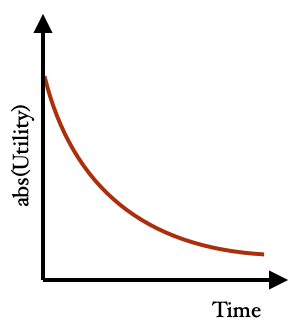
The world is continuously evolving, even when we don't actively contribute to technological advancements. As time progresses, the environment changes due to the influence of numerous factors. The context is changing over time because it is a shared environment of many actors. We can increase the fidelity and accuracy of the Bayesian network model by adding a lot of other nodes to account for this effect. The simplification in the form of the Bayesian network model suffers from this simplification: It lacks modeling time dependent utilities. The utility of all effects, intentional or side effects, would monotonically decrease over time converging to zero.[8]
We have not figured out how to solve the climate crisis. Civilization facing the climate crisis signifies that humanity is currently in the phase of the industrial society reliant on fossil fuels as the prevailing form. The amount of energy civilization consumed has grown continuously over time. Not long ago the main energy source has become fossil fuels and started the chapter of industrialization in our history. Only overcoming the dependency on fossil fuels and to become an energetically sustainable high-energy civilization would reduce the risks associated with the climate crisis. This means the faster we move out of this state the better for the risks of the climate crisis. Any action taken now has a bigger impact than doing it later.
Toby Ord classifies risks into two categories as state or transition risks. Where transition risks are risks that arise during a transition period to a new technology and state risks are existential risks that exist while remaining in a certain state. Contrary to Ord I do not think it makes much sense to differentiate since all state risks but the final state (singularity or collapse) are transitions risks by definition: There will be a certain state in the future where the risk will be eliminated or reduced. Up until then, the other existential risks remain. As long as this state is not achieved we are in transition.
Applying the net benefit analysis to AI
This presented principle of a net benefit analysis of technology is not limited to UAVs or AI and can be performed for all technology. However, I want to take a look at the area I feel more confident to rate potential shadow costs.
Will improving AI be a net benefit for humanity or not and can we now answer the question of which technologies to work on? By using the simplified model we can assign the variables of the probability and the effect. The intended first-order effects get a positive value but then we must subtract the side effects. AI is a dual-use technology. It can be used to solve various problems humanity faces, while also offering destructive faculties like more destructive weapon systems. I covered already the potential for personalised AI assistance as a positive example. One risk of every AI capability improvement is increasing the probability of getting unaligned general AI. In an article by 80k hours, different views on this work have been collected. Some of them share the conclusion outlined here. The critical path in a dependency graph is the shortest path from A to B, where every change would affect the total length of the path. Any work on something on the critical path to catastrophe is contributing. I am undecided if working on AI which does not increase capabilities should be also rated negatively because it might be on the critical path. Thousands of companies working on AI systems create the demand in a market to do capabilities research done by others, which might be the limiting factor.
When considering the sentiment that side effects are contributing potentially bigger harm than the first-order effects, we must conclude that most high-tech technological development might be a moral net negative. The sheer greatness of the potential of human civilisations and the imbalance in technological progress over cultural advancements cancels all positive effects. This is also true when considering big effects like creating man-made existential risks or the intended effects of transitioning out of an existential state.
You might not be convinced by the assessment of the maximum effects overshadowing the calculation. Depending on this you might still gain something from a more fine-grained analysis. A full net benefit analysis will follow in another post.
The risks outweigh rushing technological development as these technologies could be developed when needed. For the foreseeable future, these are not blocking humanity’s progress but they would advance the solution to existing problems. Right now it is more important to make sure that we don’t make mistakes which destroy humanity’s potential.
One should not fall into the trap of just looking at first-order effects in the short term. The time dependency is increasing the urgency. However, this is also true for differential technology development, which can be utilised for our gains.
Footnotes
- Given that Israel is quite advanced in the area of high tech military weapon systems it is surprising that Isreal was not joining the blockade.
- Article 2, paragraph 3, Proposal for a REGULATION OF THE EUROPEAN PARLIAMENT AND OF THE COUNCIL LAYING DOWN HARMONISED RULES ON ARTIFICIAL INTELLIGENCE (ARTIFICIAL INTELLIGENCE ACT)
- A list of organisations can be found on https://autonomousweapons.org, further organisations are Amnesty International and Human Rights Watch
- evidence for static views in each generation: https://www.economist.com/graphic-detail/2019/10/31/societies-change-their-minds-faster-than-people-do
- Tobi Ord: The Precipice, p. 201
- The complete calculation is done via discounting on future returns via the Bellman optimality equation. Algorithms in the domain of artificial intelligence use this calculation to train intelligent agents to chose the best action by reinforcement learning.
- This equation is simplified to guide our understanding of the problem. The development of one technology influences the utility of other existing technologies. E.g. the discovery of plane flight changed the impact of improvements in high speed trains. Some technologies might help tackling one existential risk like climate change, but at the same time increase the risks of other existential risks like non-aligned artificial general intelligence.
- There is one case where actions do not follow the path of monotonically decreasing utility. When developing a standard to a new technology and it is done too early the standard is not sufficient in capturing the problem it is trying to solve. Later, a new one will then emerge, which will coexist. To unify the two standard a third one is later introduced, which causes more fragmentation etc. C.f. https://xkcd.com/927/
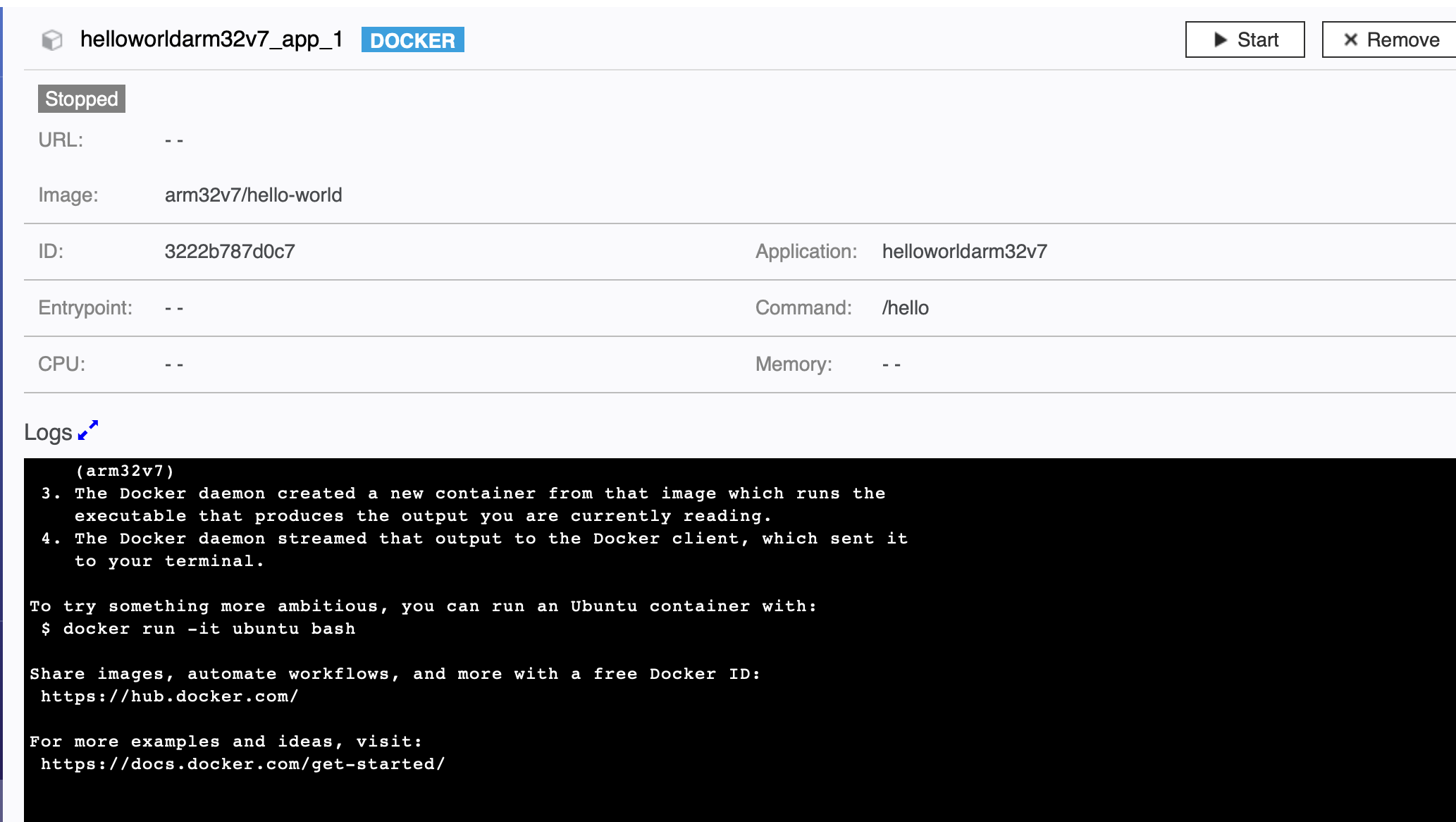
 The first challenge was making the GUI application work with the command line. Compiling was difficult because the GUI library wxWidgets was expected as a dependency and I had issues installing it. WxWidgets is responsible for handling the arguments so it could not be left out of compiling the application without it. Luckily docker solved the issue of reproducible builds. I managed to create a dockerfile that compiles the dependencies and then the application (
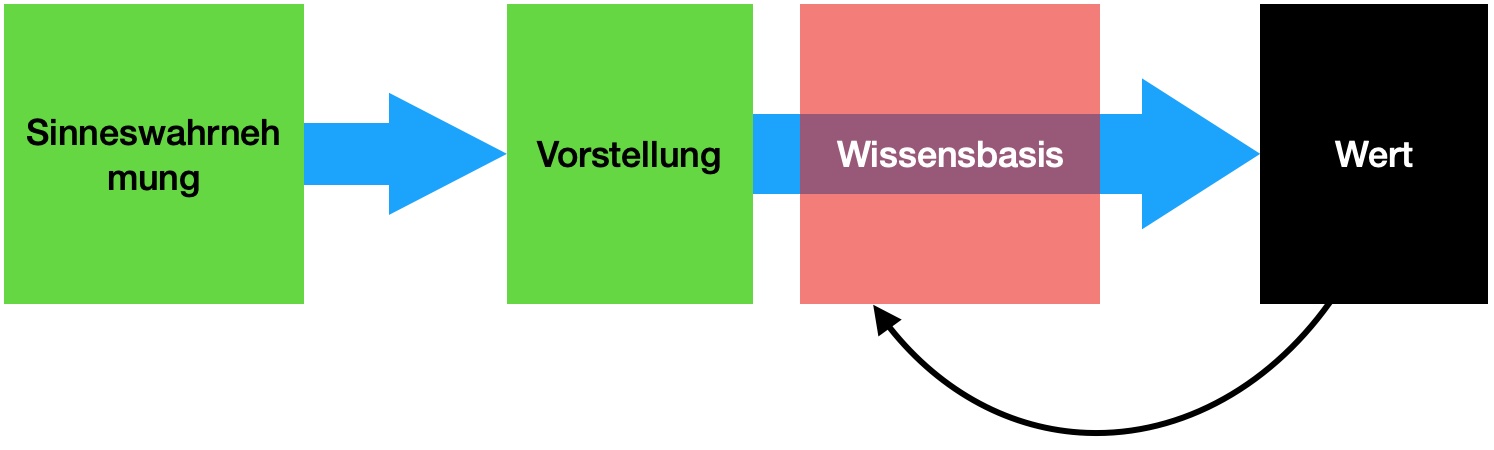 Die Frage der Geltung, also ob das eigene Urteil besser (zu einer kleinen Betrachtung von Urteilen kommen wir später erneut) sei, ist für Kant nicht sehr relevant, da als Maxime sich diese Frage nicht stellt.
Im Prozess der Regelfindung trennt Kant aber nach einer öffentlichen und privaten Funktion. Der private Bürger müsse gehorchen, während der öffentliche Gelehrte widersprechen darf. Hier spiele der Adressat der Kritik die Rolle: Wird öffentlich zur Welt gesprochen oder befindet man sich in einer Rolle, wo gehorsam Voraussetzung ist? Diese Unterteilung hat heute den veränderten Kontext, da mittels Social Media jeder öffentlich in die Funktion eines Gelehrten springen kann. Im Alltag ist die Frage der Mündigkeit die Frage, ob eine Ansicht oder Handlungsempfehlung übernommen wird, oder ob man sich auf seine Vernunft beruft. Kant bezog sich auf die empfehlenden Klassen der Gebildeten und Mächtigen.
Die Frage der Geltung, also ob das eigene Urteil besser (zu einer kleinen Betrachtung von Urteilen kommen wir später erneut) sei, ist für Kant nicht sehr relevant, da als Maxime sich diese Frage nicht stellt.
Im Prozess der Regelfindung trennt Kant aber nach einer öffentlichen und privaten Funktion. Der private Bürger müsse gehorchen, während der öffentliche Gelehrte widersprechen darf. Hier spiele der Adressat der Kritik die Rolle: Wird öffentlich zur Welt gesprochen oder befindet man sich in einer Rolle, wo gehorsam Voraussetzung ist? Diese Unterteilung hat heute den veränderten Kontext, da mittels Social Media jeder öffentlich in die Funktion eines Gelehrten springen kann. Im Alltag ist die Frage der Mündigkeit die Frage, ob eine Ansicht oder Handlungsempfehlung übernommen wird, oder ob man sich auf seine Vernunft beruft. Kant bezog sich auf die empfehlenden Klassen der Gebildeten und Mächtigen.