In vorherigen Arbeiten skizzierte ich die Möglichkeit einer führenden Künstlichen Intelligenz (KI)-Assistenz und die nötigen technischen Voraussetzungen für eine persönliche Assistenz. Nun wollen wir diese Betrachtungen der KI um die Implikation für die Ideen der Aufklärung erweitern.
Mündigkeit nach Kant
Selbstverschuldet sei der Mensch unmündig, wenn er nicht den Entschluss und den Mut fasse, sich seines Verstandes zu bedienen, so Kant im Jahr 1784. Der Ausgang aus diesem Zustand sei die Aufklärung, führt der Philosoph in seinem, für ihn im leichten Stil geschrieben Aufsatz „Beantwortung der Frage: Was ist Aufklärung?“ aus.
Mündigkeit, also die Verwendung des Verstandes zur Selbstgesetzgebung, ist für Kant Freiheit. Allerdings erkennt er auch an, dass Menschen ihre Unmündigkeit und damit Unfreiheit lieb gewinnen können. Kant erklärt ausgehend von der Mündigkeit (als absoluten moralischen Wert a priori) diese zur Maxime. Es ist aber die Freiheit, auf deren Weg die Mündigkeit liegt. Mündigkeit ist kein absoluter Wert a priori, sondern ein Zustand, der bei Erreichen einen Freiheitsgewinn verspricht. Die Frage der Mündigkeit zielt auf die Gesetzgebungskompetenz. Die Aufklärung bringt mit der Mündigkeit daher auch die Voraussetzung für die Demokratie, denn herrschen kann nur der, wer mündig ist.
Mündigkeit zu erreichen, ist allerdings nicht garantiert. Komfort und mangelndes Selbstbewusstsein können Ursachen sein, allerdings kann es auch rationale Gründe geben. Durch einen selektiven Verzicht der Mündigkeit kann der Verstand an diesen Stellen erweitert und damit individuelle Freiheit gewonnen werden.
Mündigkeit im neuen Kontext
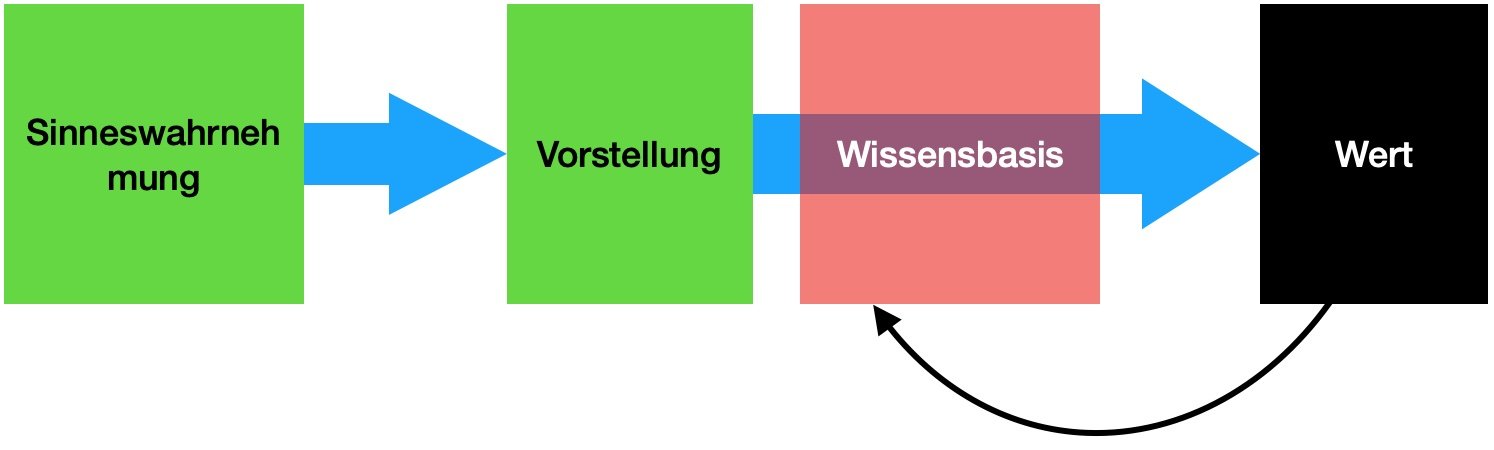
Der Mut, sich auf die eigene Vernunft zu beziehen, beinhaltet den Zuspruch zu einer von uns für richtig befundenen Wahrheit, also eine Erkenntnistheorie. Am Anfang steht das Problem, dass die Welt „an sich“ nicht erfahrbar ist. Über unsere Sinne werden Informationen zu Vorstellungen, die wir dann durch Zuordnung beurteilen und denen wir einen Wert zuweisen. Durch diese Wertung erhalten die aus den Wahrnehmungen generierte Erkenntnisse Wahrheitswerte. Die Wissensbasis beinhaltet Dinge, die wir für wahr erachten. Wenn von Vernunft gesprochen wird, wird hier, insbesondere bei Kant, meist das Werkzeug der Inferenz gemeint, um neue Erkenntnisse, also Wahrheitswerte, auf dieser Grundlage der Wissensbasis zu generieren. Wahrheitswerte entstehen, wenn die Genese eines Prozesses beschrieben werden kann oder aus der Logik. Die Sicherheit über die Korrektheit unseres Wissens ist also, sofern von einer Korrektheit der Inferenz ausgegangen wird, entscheidend für den Wahrheitswert der generierten Erkenntnis. Das die empfundene Wahrheit nicht immer ein Abbild der Wirklichkeit ist, zeigen logische Trugschlüsse wie ad hominem, oder Cherry-picking.
 Die Frage der Geltung, also ob das eigene Urteil besser (zu einer kleinen Betrachtung von Urteilen kommen wir später erneut) sei, ist für Kant nicht sehr relevant, da als Maxime sich diese Frage nicht stellt.
Im Prozess der Regelfindung trennt Kant aber nach einer öffentlichen und privaten Funktion. Der private Bürger müsse gehorchen, während der öffentliche Gelehrte widersprechen darf. Hier spiele der Adressat der Kritik die Rolle: Wird öffentlich zur Welt gesprochen oder befindet man sich in einer Rolle, wo gehorsam Voraussetzung ist? Diese Unterteilung hat heute den veränderten Kontext, da mittels Social Media jeder öffentlich in die Funktion eines Gelehrten springen kann. Im Alltag ist die Frage der Mündigkeit die Frage, ob eine Ansicht oder Handlungsempfehlung übernommen wird, oder ob man sich auf seine Vernunft beruft. Kant bezog sich auf die empfehlenden Klassen der Gebildeten und Mächtigen.
Die Frage der Geltung, also ob das eigene Urteil besser (zu einer kleinen Betrachtung von Urteilen kommen wir später erneut) sei, ist für Kant nicht sehr relevant, da als Maxime sich diese Frage nicht stellt.
Im Prozess der Regelfindung trennt Kant aber nach einer öffentlichen und privaten Funktion. Der private Bürger müsse gehorchen, während der öffentliche Gelehrte widersprechen darf. Hier spiele der Adressat der Kritik die Rolle: Wird öffentlich zur Welt gesprochen oder befindet man sich in einer Rolle, wo gehorsam Voraussetzung ist? Diese Unterteilung hat heute den veränderten Kontext, da mittels Social Media jeder öffentlich in die Funktion eines Gelehrten springen kann. Im Alltag ist die Frage der Mündigkeit die Frage, ob eine Ansicht oder Handlungsempfehlung übernommen wird, oder ob man sich auf seine Vernunft beruft. Kant bezog sich auf die empfehlenden Klassen der Gebildeten und Mächtigen.
Seit Kants Lebzeiten hat sich die allgemein verfügbare Wissensbasis verändert. Mit dem neuen Zugang zum Weltwissen führt der aufklärerische Gedanke zur Überschätzung der Vernunft. Etablierte Institutionen und Gelehrte verlieren an Wertschätzung. [1] Die freiheitsliebenden Leugner vom menschengemachten Klimawandel oder SARS-CoV-2 müssten nach Kant der aufgeklärte Mensch par excellence sein. Tatsächlich beruft sich manch ein Klimawandelleugner auf Kant.
Die Entwicklung der Massenmedien und künstlicher Intelligenzen führten zu einem verändertem Kontext, in dessen Rahmen die Rolle der Mündigkeit erneut gestellt werden muss.
Effekte des Informationszeitalters
Im Informationszeitalter wuchs die Menge an verfügbaren Informationen so stark an, dass der Verstand diese nicht mehr verarbeiten kann und überfordert ist. Unter einer Spieltheoretischen Betrachtung ergibt sich aus einem Mehr an Informationen ein Vorteil gegenüber anderen Akteuren. Es siegen die Methoden, welche größere Informationsmengen verarbeiten können. Daher wird der Überforderung mit Hilfsmitteln begegnet. Aber auch aus der Aufklärung heraus entsprungen, beinhaltet der bürgerliche Bildungskanon die Lehre von den Methoden, wie wir Kognition externalisieren können, indem wir Schrift in Büchern und Heften sowie Taschenrechner, Skizzen und Diagramme nutzen. Wachsende Informationsmengen führen unausweichlich zur Entwicklung komplexerer und mächtigerer Werkzeuge, welche superieren, also Komplexitäten zusammenfassen und reduzieren können. So können wir rasch zu einer Vielzahl von Themen einen Überblick erhalten. Diese umfassende Informationslage ist oft nicht ausreichend erklärt und kann in der Interpretation auch überfordern wirken, da die benötigten Modelle eine gewisse Komplexität benötigen. Zusätzlich ist es möglich, zu Unmengen an Information zu Dingen außerhalb des des eigenen Einflussbereichs zu gelangen. Dies begünstigt das Erstarken des Populismus, da der Populismus einfache Modelle auf komplexe Themen anbietet.
Die Psychologie zeigt uns immer wieder, wie anfällig wir für kognitive Trugschlüsse sind. Unser Erkenntnisgewinn ist voreingenommen von unserer Position in Herrschaftsverhältnissen (Standpunkt-Theorie), welche wir nach unserem Nutzen rechtfertigen oder kritisieren.
Durch den Kontrast der vernunftgenerierten Beurteilungen mit aggregierten Daten kann das Urteil einer Prüfung unterzogen werden und Trugschlüsse aufgedeckt werden.
Das Individuum kann sich durch neue Technologien im transhumanen Sinne weiterentwickeln, allerdings bei parallel auftretenden gesamtgesellschaftlichen problematischen Nebeneffekten.
Wenn der Mensch an seine Grenzen kommt und Maschinen hier übernehmen, können wir diesem Prozess aktiv zustimmen und unsere Mündigkeit bewusst abgeben? Was erwächst daraus?
Der Mensch legitimiert seine Sonderstellung im Universum durch seine kognitiven Fähigkeiten aus einem narzisstischem Bedürfnis heraus. Menschen sträuben sich deshalb gegen den Vorschlag, diese Fähigkeit anderen Lebewesen oder Maschinen zuzusprechen. Zusätzliche Unterstützung dieser Idee erfolgt durch die abrahamitischen Religionen, welche den Sonderstatus aus dem Buch Genesis, bzw. im Koran aus den Suren zur Schöpfung ableiten. Dies legitimiert Gräueltaten gegenüber nicht-menschlichen Lebewesen durch die qualitative Unterscheidung, obwohl dies dem herrschaftsauftrag in diesen Religionen widerspricht. Der Narzissmus befindet sich im anthropologischen Konflikt in der Umsetzung der Mündigkeitsaufgabe.
Warum Maschinen immer führen, aber immer einen Führer brauchen
Aus einer Intention heraus erschafft der Mensch Artefakte, wozu die Maschinen zählen. Maschinen können durch Informationsverarbeitung entscheiden und handeln. Da Maschinen qua Definition automatisch arbeitende Systeme sind, sind sie mit einem mehrheitlich unqualifizierten delegierendem Verhalten, ohne Existenzgrund, und daher innerhalb ihrer definierten Umwelt immer inhärent mündige Systeme. Kontextabhängig übernehmen sie so Arbeiten der führenden Klasse. Der Kontext ist und wird eine Frage der menschlichen Delegierung bleiben.
Die menschliche Urteilskraft benutzt Empathie – also das Lesen von internen Zuständen – und den Perspektivenwechsel. [2] Diesen können wir aufgrund gesammelter Erfahrungen durchführen. Dies ist uns durch die Ähnlichkeit der menschlichen Erfahrung und der Körperlichkeit ermöglicht. So teilen alle Menschen die Erfahrung der Geburt, Bindung zu einer Mutter, Aufwachsen mit Kindheit und Adoleszenz und alle Säugetiere teilen die Erfahrung der Körperlichkeit.
Alles Erkennen ist zugleich ein Werten. Die Wertung erfolgt auf der Wissensbasis, die im Falle des Perspektivenwechsels den menschlichen fern ist, aber zugleich auch auf der Überwindung der Limitierungen durch überlegende priors geschieht. Wie kann sichergestellt werden, dass die maschinellen Werte und die menschlichen übereinstimmen (human compatible AI)? Es benötigt also immer Menschen, die den Einsatz der KI-Systeme überprüfen. Erschwerend kommt hinzu, dass die Frage der richtigen Wertphilosophie auch für Menschen nicht abgeschlossen ist.
Zusätzlich muss bedacht werden, dass, sofern nicht eingegriffen wird, ein KI-System nach positivistischen Prinzipien arbeitet und den Status quo repliziert. Dies unterscheidet sich nicht sehr von Demokratien, die mehrheitlich konservative Politik bevorzugen. Auch deshalb benötigt es Menschen in den Rückkopplungsschleifen.
Hinderlich kann dies jedoch sein, wenn die KI Systeme Entscheidungen treffen, die nicht nachvollzogen werden kann. Eine Entscheidung mag man nicht nachvollziehen können, sie ist aber die bessere – Ähnlich einem Kind, was lieber statt zur Schule zu gehen, den ganzen Tag fernsehen und Süßigkeiten essen will. Die Nichtbefolgung könnte dann wohlmöglich unethisch sein.
Der Nutzen der Mündigkeitsaufgabe
Der Nutzen der Mündigkeitsaufgabe ist auch ein pragmatischer, instrumenteller, wenn wir darauf vertrauen können, dass KI Systeme rationaler entscheiden, da mehr Evidenz superiert werden kann oder die Wissensbasis umfassender ist und damit die bayes’schen Wahrscheinlichkeitsverteilungen (priors) via transferierendem Lernen genauer sind. Dinge können sichtbar gemacht werden, die vorher unsichtbar waren.
Neue Sensorik ermöglicht die Erfassung größerer medizinisch relevanter Datenmengen, was von Befürwortern unter dem Stichwort „quantified self“ beworben wird. Diagnosen sind durch KI-Systeme genauer, als ein einzelner Arzt sie erstellen kann. Behandlungsrichtlinien der Weltgesundheitsorganisation WHO erfassen häufig nur einen Parameter wie das Alter. Werden KI Systeme genutzt, können Diagnosen präziser erfasst werden, was einer Handlungsempfehlung gleich kommt, und direkter optimale Therapien erstellt werden.
Die Nutzen durch die Mündigkeitsaufgabe erstreckt sich nicht nur auf medizinische Anwendungen. Mit dem Erreichen einer juristischen Altersgrenze ist die Bildung eines Erwachsen nicht abgeschlossen. Aus der Idee der Pädagogik entspringt die Erziehung des Menschen hin zur Sittlichkeit. Dies ist ein Prozess ohne Abschluss. Künstliche Intelligenz für die Massen bietet ein Werkzeug zur Ermächtigung und kann beflügeln.
Diese Idee, Technologie zur Überwindung der limitierten biologischen Natur zu nutzen, greift die die Kernidee des technologischen Transhumanismus auf.
Gesetzgebungsprozess im Informationszeitalter
Den Kontext der KI-Systeme und ihre Arbeitsweise benötigen eine gesellschaftliche Legitimation. Wir können Kant aufgreifen: Die öffentliche Debatte und Kritik soll an den KI-Systeme geschehen, privat sollte den Empfehlungen gefolgt werden. Um diese Öffentlichkeit für eine Debatte herzustellen, müssen die Algorithmen offen gelegt werden. Diese Anforderung gibt es zurzeit nicht. Die Schwierigkeit ist hier, Anreize zu Investitionen in die Entwicklung der Systeme bestehen zu lassen. Hierfür müssen neue Gesetze erlassen werden.
Statt das Individuum oder eine herrschende Klasse in die Verantwortung zu nehmen, über das eigene Leben zu verfügen, kann die Verantwortung auch auf das Kollektiv verteilt werden wie in der Sozialdemokratie oder anderen sozialistischen Entwürfen. Als Gegenentwurf zur Klassengesellschaft entwickelte man die sozialistische Theorie der Führung durch die Massen der Proletarier. Auch die Idee der autonomen Verwaltung versucht die Rolle der herrschenden Klasse aufzulösen. Die Mündigkeitsaufgabe wird durch den Massenentscheid bzw. des Basisentscheids legitimiert.
Neue Medien führen zu einem neuen Aggregationsprozess der Meinungen im demokratischen Diskurs. In der Moderne zeigte sich der starke Zuwachs der Bedeutung der massenpsychologische Effekte und der einhergehenden Reduktion der Rolle individueller Unterschiede im politischen Prozess. Mittels statistischer Methoden lassen sich solche Masseneffekte messbar machen und mittels kurzen kybernetischen Feedbackschleifen lassen sich automatisiert Umgebungen formen, die die menschliche Psyche ausnutzen. Propaganda lässt sich so mittels KI individualisieren. Auf die Vernunft der Massen im kybernetischen Kontext zu vertrauen, ist also falsch, da sie bereits den Effekten der KI-Systeme unterliegen.
KI Systeme im Kapitalismus
Auch zum Zweck der Machtsicherung werden in allen Ländern Möglichkeiten zur Überwachung der Bevölkerung gesucht (z.B. die US Crypto Wars). Intelligente kybernetische Systeme können hier als Regler der Meinung in der Bevölkerung in einem kybernetischen Stabilisierungsmechanismus dienen.
Im Kapitalismus ist Wissen eine Ware, die durch geistige Eigentumsrechte geschützt wird. Dieses Wissen umfasst die Architektur, Parameter und exklusiven Trainingsdaten der KI-Systeme. Die Systeme laufen aus Gründen der Anforderungen an die Hardware oft auf Firmenservern, aber auch um die gelernten Parameter vor Vervielfältigung zu schützen. Die Verwaltung der KI-Systeme durch private Unternehmen birgt Risiken aber auch Chancen. Hochwertige Aggregationen von Daten lassen sich oft nur durch einen erheblichen Aufwand erlangen. Frei verfügbare Daten reichen in vielen Fällen nicht aus oder können nicht von Individuen erlangt werden. Nur durch die kommerzielle Umsetzung ist dies möglich. Allerdings gelangen private Unternehmen so an intransparente Macht, ohne demokratische Legitimierung.
Die Frage nach der Kontrolle der KI-Systeme ist also vergleichbar zur klassischen Machtfrage im Kapitalismus. Der Sonderstatus der KI-Systeme als führende Entitäten fordert konzentriert den Bedarf zu eine demokratische Legitimation heraus. Neben einer teilweisen Offenlegung des Systems könnte eine Regulierung z.B. durch eine Zertifizierung der KI durch demokratisch legitimierte Menschen das Problem lösen.
Zusammengefasst lässt sich feststellen, dass die Machtfrage noch nicht abschließend geklärt ist und die Integration von KI-Systemen ein offener Prozess bleibt. Mit der zunehmenden Bedeutung dieser Systeme ist die Dringlichkeit in den nächsten Jahren gegeben.
Disclaimer
Der Autor ist Backend & Machine Learning Engineer bei einem Medizinunternehmen (iATROS).
Fußnoten
- Jean-Francois Lyotard untersucht den Vertrauensverlust im Informationszeitalter in seinem Werk „Das postmoderne Wissen"
- Zwei Fertigkeiten in verschiedenen Hirnarealen www.mpg.de/16022689





 but the utility of the SC in case of increasing existential risk are enormous
  . Depending on the outcome of the equation it should matter whether this technology should be worked on or not.
 The first challenge was making the GUI application work with the command line. Compiling was difficult because the GUI library wxWidgets was expected as a dependency and I had issues installing it. WxWidgets is responsible for handling the arguments so it could not be left out of compiling the application without it. Luckily docker solved the issue of reproducible builds. I managed to create a dockerfile that compiles the dependencies and then the application (